
Thirteen chapters. Built from three published Section 087100 specifications, the SDI and HMMA standards, and public interviews and forum discussions with working Division 8 estimators, detailers, and hardware consultants. Everything quoted here is public and sourced.
Who prices Division 8 doors, frames, and hardware
Anyone who prices doors, frames, and hardware for a living, and anyone who has to check the number afterward.
Division 8 is a small trade with an outsized ability to hold up a building. People in this trade put the ratio the same way every time: doors run somewhere near one percent of construction cost and a wildly disproportionate share of the problems, because they arrive last and everything else has to be finished before anyone finds out what’s wrong with them.
This book is about the part of that problem that happens before anything gets installed. It’s about the documents.
Three kinds of Division 8 estimator: solo, distributor, and GC self-perform
“The typical Division 8 estimator” doesn’t exist. There are at least three distinct jobs, and a book written for one of them reads wrong to the other two. Most of what follows applies to all three, but where the pain concentrates differs, and it’s worth knowing which seat you’re reading from.
| Solo or small-shop estimator | Distributor with a rep team | GC self-perform precon | |
|---|---|---|---|
| Volume | A handful of bids at a time | High, and steady. Many packages moving at once | Fewer bids, larger and longer |
| Biggest constraint | Time. Bids get declined because there aren’t hours to price them | Consistency. Takeoffs run through people who aren’t estimators | Verification. Somebody else did the work and you sign it |
| Where margin is lost | Bidding the wrong jobs, or no-bidding winnable ones | One wrong assumption replicated across a hundred takeoffs | Scope landing between divisions and nobody carrying it |
| Chapters that matter most | 9, 10, 11 | 5, 6, 12 | 7, 12, 13 |
How to use this book
Part I covers the documents you’re handed: what a door schedule carries, what an 087100 spec actually says, and how hardware sets are published across three real owners. Part II is the takeoff itself, from counting openings to getting hardware into a system to pricing what you counted. Part III is where bids go wrong. Part IV is the part worth reading twice, because it’s about how estimators who do this well turn document problems into margin rather than absorbing them.
Every chapter ends with a section called What to do on your next bid. If you read nothing else, read those.
How sources are named and attributed in this guide
Everything quoted here is public. Named practitioners spoke or wrote under their own names, in podcasts, published comment threads, and trade discussions, and they’re named. Estimators who posted under handles in public forums are described by role instead. Where a source works for a manufacturer or a software company, that affiliation is stated every time they’re quoted.
Three published Section 087100 specifications are examined in detail throughout: the City of Santa Fe’s Fire Station No. 2, Cornell University’s Design and Construction Standards, and Michigan State University’s Construction Standards. All three are public documents. Nothing in this book is a hypothetical.
Chapter 1. What a Door Schedule Actually Is, and What It Leaves Out
A door schedule is a table of openings, one row per door, and the steel industry’s own recommended version carries twenty-three columns. Filled in correctly it still won’t price the job, because most of what moves a Division 8 number sits in another document or in none of them. The takeoff is a reconciliation before it’s a count.
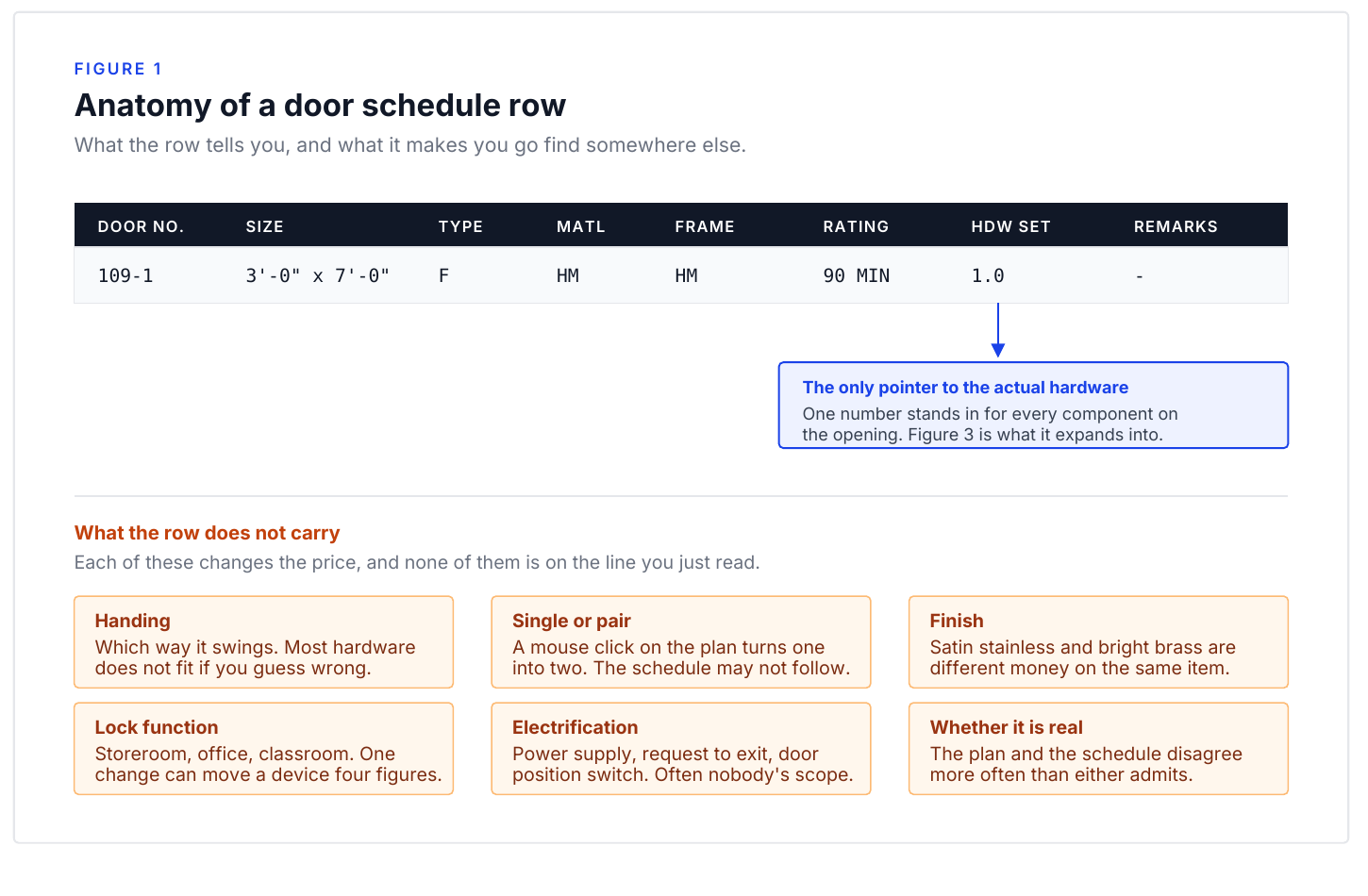
SDI 111D-24 lists twenty-three columns, several of them cross-references
SDI 111D-24, “Recommended Door, Frame and Hardware Schedule for Standard Steel Doors & Frames,” lists a complete row as: Item No., Arch. No., From, To, Qty, Hand, Label, Frame Gauge, Elev., Depth, Anchor/Wall Type, Head, Jamb, Sill, Door Gauge, Type, Width, Height, Hdwe. Group No., Hinges, Lock, Closer, Remarks.
Few of those columns contain an answer. “Hdwe. Group No.” points at Section 087100, “Anchor/Wall Type” at the wall type legend, “Label” at the life safety plan. They tell you which document to read next. The schedule also carries defaults that never appear as entries: an SDI general note reads “Doors provided with 3/4″ undercut unless otherwise specified,” and on a rated opening a wrong undercut is an NFPA 80 failure, not a trim item.
Section summary. The schedule’s most expensive columns are cross-references, not data: hardware group number to the 087100 spec, wall type to the legend, label to the life safety plan. Reading a schedule means reading four documents.
Frame, leaf, and hardware price as one rated assembly
Lori Greene, Manager of Codes and Resources at the hardware manufacturer Allegion, described a rated opening on a fire door inspection podcast, and it holds beyond fire doors:
“it’s not only just the door, it’s really the whole assembly. You have all the components, the door frame, the hardware, lock, panic, fire exit hardware… door closer, anything that’s going on to that door is a component.”
The assembly is the unit. ANSI/SDI A250.8-2017 says a component substituted below the assembly’s intended rating produces “a corresponding decrease in rating or the loss of rating in its entirety.” The requirement originates in the partition, so the life safety plan governs the Label column.
Section summary. A door is an assembly of frame, leaf, and hardware, rated no higher than its weakest component. The requirement originates in the partition, so the life safety plan governs the Label column.
Doors are one percent of construction cost and most of the field trouble
Mia Merrel and Benji Bolick, both of the manufacturer ASSA ABLOY, spent an hour on the Construction Brothers podcast on that asymmetry. Doors “are like 1% of the construction costs, but they’re like 90% of the construction headaches when you’re installing or when you’re trying to finish the job because they come in the last.” Asked why architects struggle with the scope: “They aren’t huge fans of doors because there’s so many different compliances and rules and codes that go into doors that I mean, no one person could handle all that.”
Handing, duty level, core, and louver free area are left open
Handing. Hand comes off the keyed side, so on an interior opening with no outside it isn’t settled until the hardware schedule assigns the key side, which makes any schedule handed before the hardware schedule provisional.
Duty level. SDI runs four levels, HMMA six, and the names don’t line up. “Heavy duty” is an 18 gauge door under SDI-108 and a 16 gauge door under HMMA 805, so heavy duty with no level number is ambiguous by a full gauge.
Core. A250.8-2017: “The core design shall be at the discretion of the manufacturer.” A Level 3 exterior door with a honeycomb core complies with the standard and fails the energy spec, so polyurethane and temperature rise cores have to be named.
Louvers. The Type column uses SDI letter symbols and none carries performance. A pierced louver delivers about 20 percent free area and an inverted-Y inserted louver 50 to 60 percent, so guessing undersizes the opening by a factor of two and a half.
Section summary. Handing is provisional until the key side is assigned, duty level names different gauges under the two competing standards, core is the manufacturer’s choice unless named, and a louver letter carries no free area. Four price variables, all left open.
Four ways the door schedule disagrees with the bid set drawings
Section summary. Door schedules disagree with the bid set four repeating ways: drawn but not scheduled, scheduled but not drawn, counts that differ from the plans, and set assignments that conflict with the 087100 spec. How long a takeoff runs is decided by those disagreements, not by the number of openings.
What to do on your next bid
Before you count anything, put the four documents that define an opening in front of you: the door schedule, the floor plans, Section 087100, and the elevations. Read the general notes first, where the defaults you’re inheriting are written. Undercut is the one that bites.
Then confirm every pointer column resolves: hardware group number in the spec, wall type in the legend, label on a rated partition. If one doesn’t, you haven’t found a takeoff question. You’ve found an RFI, and Chapter 11 is what that’s worth while there’s still time to send it.
Chapter 2. Reading the 087100 Spec
The hardware schedule inside an 087100 spec isn’t a table. It’s text formatted to look like one, which is why every tool you point at it comes back broken. The quieter half: a vague line extracts perfectly and fails on site.
The 087100 hardware schedule is text, not a table, after PDF conversion
A Division 8 supplier asked a public estimators forum for “a (near) fool proof method of extracting door hardware schedules from 087100 specs as tables into Excel.” The thread drew 59 comments and no method that held. We broke down why every PDF tool fails — and the least-worst workflow — in how to extract a door hardware schedule from an 087100 spec. He’d diagnosed the cause himself:
“The lack of visible lines at cell edges/columns & rows really hurts every software solution’s ability to properly figure out the table layout.”
Hardware consultants author schedules in a word processor; the PDF conversion throws away the cell boundaries, leaving text that only looks tabular. Same estimator: “The GC often doesn’t have a non-PDF version anyways… Gotta work with what I got, ya know?” The output fails three ways on nearly every schedule: merged columns, with quantity collapsed into description; broken door number lists scattered across cells; and wrapped-text rows, a wrapped description read as a new row.
Section summary. A hardware schedule in an 087100 spec is text formatted to look like a table, because the cell structure died in the Word-to-PDF conversion before software opened it. Extraction fails those same three ways every time.
An underspecified 087100 line gets bid to the cheapest compliant product
Marc Ameryckx and Dikesh Pattni, both of the manufacturer ASSA ABLOY, host a podcast on door specification. Pattni’s example is one every estimator has seen: “as a contractor, you’re looking at that specification and thinking, okay, well, they’ve just looked at a steel door. Shall I just then go out and get the cheapest steel door or do I need to have a certain performance on that steel door?” Ameryckx described a job where the owner expected a multi-point motorized lock and got “an electric strike of 50 euros. That was it. He respected the specs, but at the end the owner wasn’t happy at all.”
Section summary. An underspecified line extracts cleanly and gets bid to the cheapest product satisfying the words, compliant and frequently not intended. “Electric device” and “steel door” are complete sentences and incomplete scopes.
Check whether Part 2 and Part 3 exist before pricing line items
Read the document’s shape before its line items. Whether Part 2 and Part 3 exist at all, whether a finish-designation clause points at content the spec contains, and whether electrified sets say how the opening operates all change what you’re pricing. Michigan State University’s has no sets to find. One estimator explained why hardware sections get reissued wholesale at Addendum 1:
“This occurs most often from a copy paste specification utilized to expedite permitting. If a consultant is involved, they overload the hardware sets in order to sell the most product, and manipulate the specifications themselves so substitutions can’t be made… once the hardware conglomerate gets in the building it’s hard to introduce a competitor.”
Section summary. Check whether Part 2 and Part 3 exist, whether a finish-designation clause points at content the spec contains, and whether electrified sets say how the opening operates. Specs written fast for permitting get replaced at Addendum 1.
What to do on your next bid
Extract with whatever fails predictably, then verify four items before any of it reaches your estimating system: row counts per set, door totals both directions, electrified hardware line by line, and spec-versus-schedule conflicts. A better tool doesn’t shorten that, because the error that hurts you changed a value quietly.
Then read it again for a different question. Mark every line naming a material or a function with no performance: a steel door with no level, an electric device with no function, a hinge line with no weight. Those price to the cheapest compliant product, and the distance to what the owner pictured is somebody’s exposure.
Chapter 3. Hardware Sets: How Three Real Owners Publish Them, and Why It Changes Your Takeoff
A hardware set is a bundle: every component on one opening, in quantities, with catalog numbers and finishes, under the number the door schedule points to. The execution isn’t standardized. This chapter compares three published Section 087100 specs: the City of Santa Fe’s Fire Station No. 2, Cornell University’s standards, and Michigan State University’s.
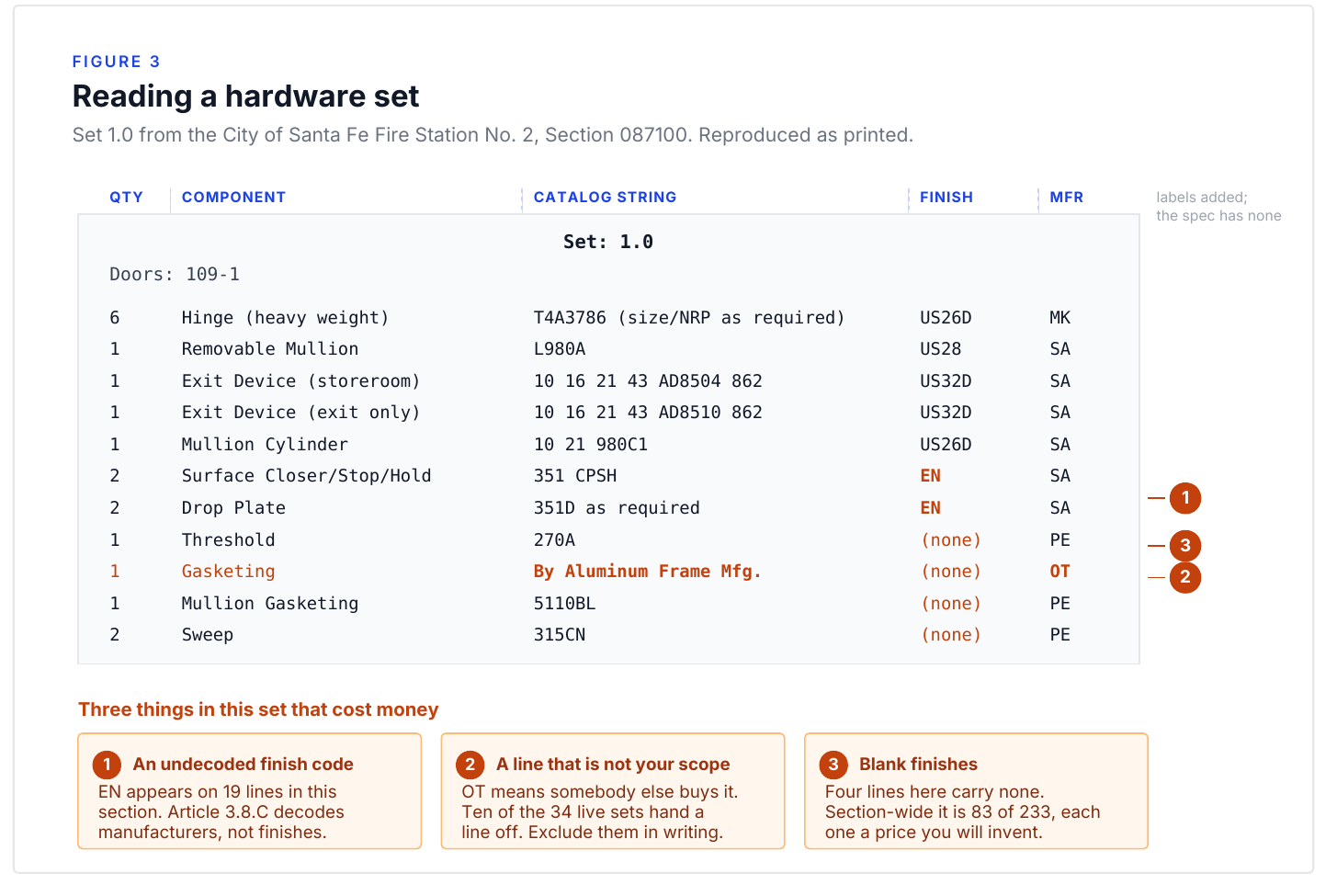
Section summary. A hardware set bundles every component for one opening under a number the door schedule references. The columns are frequently unlabeled, so reading one depends on knowing the convention.
Santa Fe publishes 40 hardware sets and marks six not in use
The spec carries 40 set headers and 233 line items across all 40. Six headers are captioned “(NOT IN USE),” so 34 sets are live, carrying 196 items. Doors are assigned explicitly, a Doors: line on 35 of the 40 headers, 76 unique numbers — the document’s most useful feature, and where its worst problems live: four doors go to two sets at once, nine to a set marked not in use. Santa Fe also voids scope inside its own sets: ten of the 34 live sets, 29 percent, hand a line to another trade (“By Gate Mfg.,” “By Roof Hatch Mfg.,” “By Security Integrator”).
Cornell publishes 23 hardware sets with no finish designations at all
Cornell’s standard runs 30 pages: 23 set headers, 186 line items, and not one finish designation, zero US codes and zero BHMA numerics. Every hinge line in all 23 sets shares the model column: “3 Hinge As Required MK.” The quantity moves and the product never does. Cornell does one thing better than the others: Article 3.08.B requires that “every hardware set that has electronic hardware shall be provided with a ‘Theory of Operation.’” It’s the only prose inside any hardware set in the three documents, and the best practice of the three.
Section summary. Cornell keeps door-level bundling and strips out the product detail: no finishes, hinges “As Required,” a quarter of the line items unpriceable. Its Theory of Operation requirement is the best practice of the three.
Michigan State publishes component tables by usage instead of hardware sets
The MSU standard has no Part 2 and no Part 3. Hardware appears in Article 1.8 organized A through M by component type across nine tables. Nothing is bundled, numbered, or assigned to a door. You match usage to a row, pull the product, and repeat that nine times per opening. Article 1.3.A.2 then requires your submitted schedule to organize the hardware into sets “at the end of Part 3.” There is no Part 3. The assembly is yours, and two bidders reading MSU produce different set counts, contents, and scope boundaries.
Set-based specs and component-menu specs need different pricing postures
| Santa Fe | Cornell | Michigan State | |
|---|---|---|---|
| Sets published | 40 headers, 34 live | 23 | none |
| Line items | 233 across 40 headers, 196 live | 186 | 61 usage rows |
| Doors assigned to sets | yes, 76 doors | no | no |
| Finishes stated | 64% of lines | none | series never selected |
| Hinges specified | series and weight class | “As Required” | by usage table |
| Who assembles the set | owner | owner | you |
On a set-based spec your exposure is in the errors, which is the Chapter 11 audit; on a component-menu spec it’s in the assembly you build.
Hardware set submittals disagree on quantity per opening versus set total
When a hardware set is submitted, should each line show the quantity for one opening or the total across every opening in it? Emilio Bendever, a working detailer, raised it publicly in 2025, describing his own software: Comsense uses the total quantity for all openings, while “every other program I’ve ever used shows the quantities per door.” Lori Greene of Allegion replied: “the hardware set should show the quantity per opening.” The convention is unsettled between the trade’s certifying body, its most-cited code authority, and its most-used software. Get it backwards on a 40-set project and every downstream number is wrong by a multiple.
What to do on your next bid
Answer three questions before counting anything. Does the spec publish assembled sets or a component menu? If sets, are doors assigned? What quantity basis does it state?
Those answers decide whether your next four hours go into auditing someone else’s bundles or building your own, and everything downstream inherits the error if you get them wrong.
Chapter 4. Counting the Openings: Match Lines, Duplicate Tags, and Drift
A door takeoff goes wrong less from miscounting than from the same opening being drawn on two sheets, tagged twice in one schedule, or listed on a page copied across three buildings, none of which a sheet-by-sheet count can see. Ninety-nine percent accuracy on a 2,000 door project is still twenty wrong doors, and a Division 8 material quote has nowhere to absorb them.
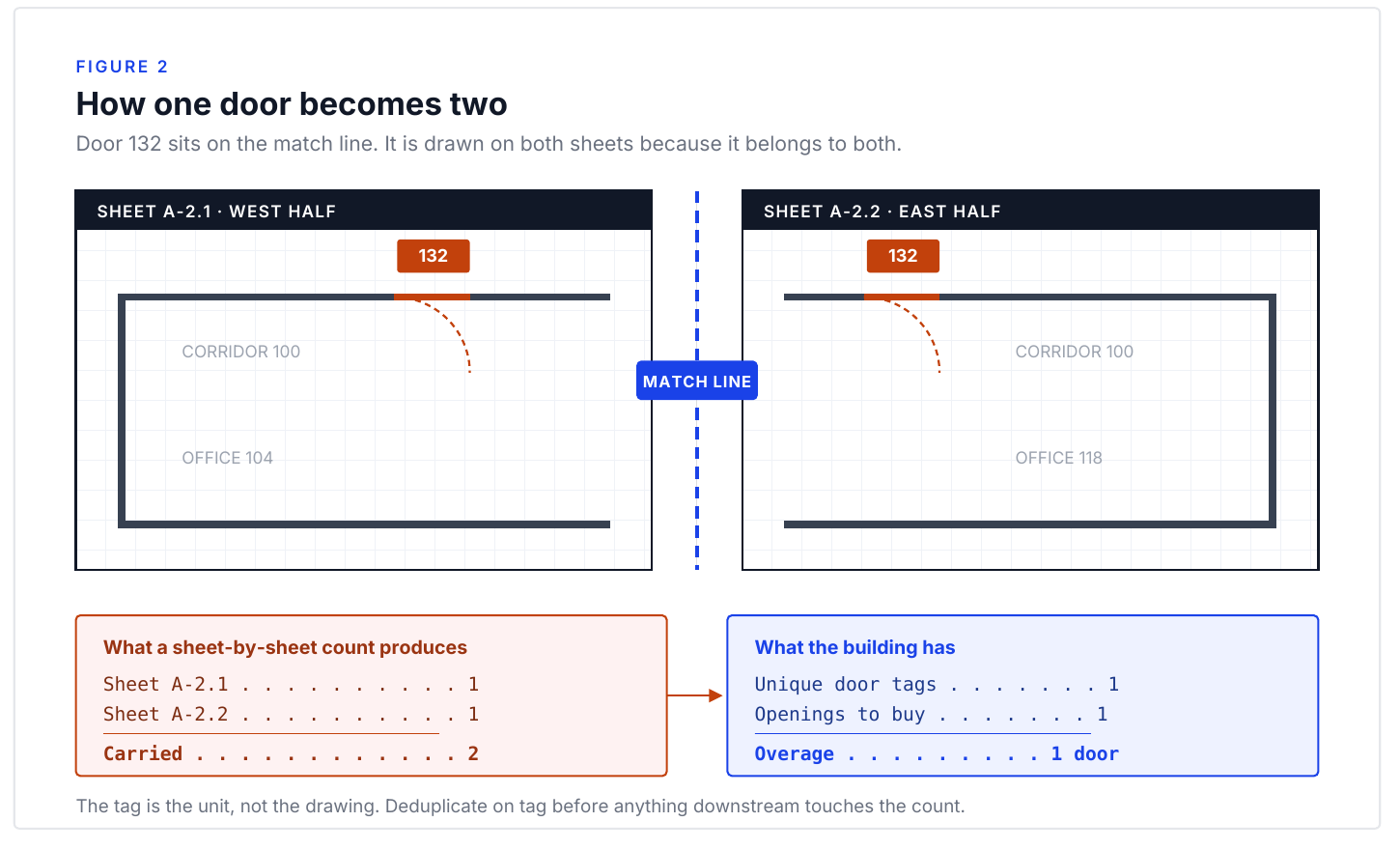
Match lines put the same opening on two sheets by design
On a large footprint the architect cuts the plan into sections joined by match lines, so openings near a seam appear on both sheets. That’s the convention working correctly; it becomes a count error because counting proceeds sheet by sheet. A double counted door inflates your material number and you lose the job; a door that fell between two sections never gets priced, and you find that out of your own margin. We walk through all five drift points in match lines, duplicate tags, and double-counted doors.
Section summary. Sectional plans show doors at match lines on more than one sheet by design, so a sheet-by-sheet count doubles them unless someone deduplicates across the seams. Double counted openings cost you the award; lost ones cost you margin after you win.
Duplicate door tags and reused type codes break a tag-based door takeoff
On one 752 door commercial schedule, the tag S60004A appeared three times. Architects also recycle type codes across schedules, so a code means one product in one place and something else forty sheets later. One estimator: “I saw a Div 08 one recently where there were 3 different clear openings for one door on the same page.” Read the schedule as an index into the plans — the same failure we covered in the fake door schedule problem — and a duplicate tag is an item to resolve. Read it as the count and it’s a number you defend on bid day without knowing.
Repeated multifamily schedule pages multiply one wrong door across every unit
Unit types repeat across floors, floors across buildings, and schedule pages are reissued per building, so counting each repeated page as its own openings gives you every building twice. It fails the other direction too: two pages that look identical can differ by one unit type substitution. One patio door on the schedule that isn’t on the unit plan is a one door discrepancy until you multiply it by forty units across three buildings.
Reconcile the door schedule against the plans in both directions
Doors appear in the schedule and nowhere on a plan. Doors appear on plans and never make the schedule. A type shows three times in the schedule and eight on the drawings. Reconciliation means running it both directions and resolving or documenting every mismatch before anything gets priced. That record is what lets you defend the count instead of re-arguing it with the GC from memory.
Section summary. Reconcile counts both directions area by area, resolve or document every schedule-to-plan mismatch, and keep the record. A mismatch you absorbed silently is indistinguishable, three months later, from a mistake you made.
General-purpose takeoff software has no memory of match lines or tags
General purpose takeoff software counts what’s drawn on the sheet in front of it. Estimators using those tools on Division 8 work report the expected artifacts: double-lined doorways counted once per line, measurements captured behind cabinets, unit-by-unit tagging still done by hand. A counting engine has no concept of a match line, no memory of a tag from another sheet, and no way to know page 14 of the schedule is a reissue of page 11. The counting layer was never the hard part; the cross-document layer is.
What to do on your next bid
Run six checks on the door takeoff before the number leaves your desk. Reconcile schedule counts against plan counts both directions, area by area. Scan for duplicate tags inside each schedule and reused type codes across schedules. On a sectional set, walk the match lines and look at every opening near a seam. On multifamily, confirm repeated pages are identical before treating buildings as copies. Count leaves separately from doors. Then document every resolution and turn what’s left into an RFI the day the invitation arrives.
On a Denver project, roughly two hundred doors sat in a schedule buried in the set and the bid went out short by all two hundred. The count wasn’t careless. Nobody knew there was a second document.
Chapter 5. Getting Hardware Into the System
Two decisions determine whether a hardware import is right, and both get made in the first ten minutes: which quantity basis the source document is using, and how its sets map onto openings. The rest is typing, and typing errors announce themselves. These two don’t. They produce a schedule that imports cleanly, totals cleanly, and is wrong by a multiple.
The five-step hardware entry workflow, from PDF extraction to price books
The workflow hasn’t changed much in a decade: pull hardware set information out of a specification, reformat it into the columns your estimating platform expects, cross-reference the sets against the door schedule, enter the line items, and price against manufacturer books. Among Division 8 estimators naming tools in public, Comsense is the clear majority and eMullion a distant second. We covered how AI-ready output collapses that five-step cycle into two in getting hardware sets into Comsense faster.
Several hours happen before you open the platform, and they go to interpretation. Specifications arrive with quantities missing. Door schedules reference sets that don’t exist. Hinge counts go unstated because the architect assumes the estimator derives them from door height, closer sizes from width and fire rating. A door gets assigned to set 107.3 on the schedule and 107.4 in the specification, and somebody has to decide which governs.
Section summary. The hours in hardware entry go to interpreting incomplete documents, not to keystrokes: unstated hinge counts and closer sizes, sets the schedule references that don’t exist, and assignments that conflict between the schedule and the spec. That’s expert work, and the workarounds estimators build for it don’t transfer.
Confirm quantity per set versus total item quantity before importing
A Division 8 estimating software vendor’s training screencast stops on this first:
“they do use two different quantity, there’s a quantity per set and a total item quantity. Make sure you do quantity per set.”
Quantity per set is the count of each item for one opening carrying that set. Total item quantity is that number multiplied across every opening the set is assigned to. Choose wrong and every quantity downstream is off by the number of doors in the set, and nothing looks broken, because the numbers are internally consistent.
Import door tags and set numbers first, then read the orphan warnings
From the same screencast: “before you import hardware, you do need to at least import the door tag numbers and the hardware set numbers.” Until those are loaded the system has nothing to validate against; once they are, it starts finding things: “popped up a message that hardware set 1.1 is missing from the door schedule.” That’s an orphan — a set in use the door schedule never references, a document error surfaced only because the tags went in first. The operator found the cause upstream: “they have a column called number of doors. You see some of them are set to zero… I sorted it by this number of doors column and deleted all the zeros.”
Section summary. Load door tags and hardware set numbers before the hardware itself, then read the import warnings instead of clearing them. An orphan warning means a set is in use that the door schedule never assigned, and sets showing zero attached doors are worth sorting into one place.
One heading per opening configuration, and split singles from pairs
A second software vendor’s product video states the convention: dissimilar openings go on separate headings, so a schedule with 40 sets carries 40 configurations. Pair hardware is counted in separate columns for the active and inactive leaf, so a single and a pair don’t share a heading. Architects combine them anyway: “sometimes an architect will use the same hardware set for a single and a pair of doors… you could go to door number two and instead of hardware set one, maybe make the hardware set for door two 1A.” Splitting it costs a minute and makes the quantity basis unambiguous for both openings.
New items in your price database have no purchase history behind them
The manufacturer list has to reconcile against your own first, and that mapping isn’t clerical: the supply vendor you match a manufacturer to sets the discount. From the import screencast: “There’s close to 300 items in this spreadsheet. 43 of them were new items added to the database.” New items have no purchase history behind them, which makes them the most likely to carry a stale price. A schedule where a seventh of the items are new isn’t one you’ve effectively priced before.
What to do on your next bid
Before you import anything, answer one question in writing: is this file quantity per opening, or quantity totaled across the set? Write it at the top of the sheet, because you won’t be able to tell from the output.
Then import door tags and set numbers first, hardware second, and treat every warning as a finding. Sort by attached door count and look at the zeros. Count what’s new to your database, and split any set an architect applied to both a single and a pair.
Chapter 6. Pricing What You Counted
A per-opening number means nothing until somebody says what hardware it buys. The public exchanges between estimators land in the same place: the round number is well below what the opening costs, and the person carrying it doesn’t know which components he’s short.
A per-opening allowance hides the function that drives the price
A GC-side estimator carrying $400 an opening got corrected by a Division 8 distributor estimator: “At $400/opening in today’s market, you’re barely getting a Gr. 2 lock, set of standard BB hinges, and a wall or floor stop.” Three items. No closer, no exit device, no gasketing, no threshold, nothing electrified, nothing on a pair. Another estimator: “A different function on a panic device can make it cost $1000+ extra.” At the other end, one estimator put “$2,000 a hm egress opening supply only” on the record — five times above the number that started the argument.
Section summary. Published per-opening figures from Division 8 estimators run from roughly $400, which one distributor estimator described as barely covering a Grade 2 lock, hinges and a stop, up to a stated $2,000 for a hollow metal egress opening supply only. Hardware cost tracks function, and function is invisible in an opening count.
Section 232 tariffs hit frames, hardware, and locksets at different rates
“Section 232 status as of August 5, 2026, HTS Revision 15. Verify at hts.usitc.gov before relying on these figures. Hollow metal doors and frames (HTS 7308.30) and aluminum doors, frames and thresholds (HTS 7610.10): 50 percent. Builders’ hardware under HTS 8302, including hinges, closers, pulls, kick plates and escutcheons: 25 percent, caught as derivative steel and aluminum. Locks and locksets under HTS 8301: on no Section 232 list. Since April 6, 2026, all of these apply to the full customs value of the article rather than to its metal content.”
On one opening you can carry a frame at 50 percent, a closer at 25, and a lockset at zero. Exit devices sit on the boundary — covered at 25 percent if your supplier classifies them under 8302.41.60, uncovered under 8301.40.60 — so ask your supplier instead of assuming. Aluminum mill shapes rose 30.5 percent and steel mill products 17 percent over calendar 2025. Bid the frames in March, take the award in June, and that spread happened to your number while you waited. We covered keeping a bid current in keeping door hardware pricing current for Division 8.
Manufacturer price books load into estimating systems weeks or months late
Comsense and eMullion both price hardware against manufacturer price books, and those books arrive as catalogs that people digitize, validate and load every time a manufacturer issues an update. Nobody publishes how long, and the trade’s own accounts put a system price somewhere between a month and a quarter behind the manufacturer’s book. For most projects nobody notices. On a long bid-to-award window in a volatile metals market it’s exposure you can’t see, because the estimate looks correct.
Section summary. Estimating platforms price against manufacturer books that have to be digitized, validated and loaded by hand, so a system price is only as current as the last load, and how far behind that sits is not something any platform states. The lag is invisible in the output and compounds with every week between your bid and your award.
Specifications leave finishes blank and mix US, BHMA, and proprietary codes
In the City of Santa Fe’s Fire Station No. 2 spec, 83 of 233 line items carry no finish at all — every gasketing line, every threshold, every sweep and every silencer — and those are the items an estimator prices from habit rather than the page. The lines that do carry a finish mix three notations in one column: US32D (traditional US designation), 630 (the BHMA numeric for the same family), and EN (a manufacturer-proprietary code the document never decodes). Cornell’s standard is the extreme: 23 sets, 186 line items, not one finish designation.
A current price book cannot fix a wrong opening count
Everything above assumes the count is right. On one Denver project, a schedule buried in the set went uncounted, roughly two hundred openings never made the number, and the job went with it. The markup is thin enough that neither error has anywhere to go: competitive Division 8 hardware markup runs near 20 percent among estimators who discuss it publicly.
What to do on your next bid
Put a date on the price book you bid from, in writing, in the proposal. Not the bid date. The price book date. It’s the difference between repricing a stale number and arguing about one.
Then decide in advance what triggers a reprice: an award window past sixty days, a metals move you can read in the trade press, or an addendum that changes the hardware. And count the finish column, because every line with no finish stated is a price you’re about to invent. On a 233 line schedule, that was 83 of them.
Chapter 7. The Division 8 / Division 28 Seam
An electrified opening is priced in one section, powered in a second, connected in a third, and the documents rarely say who owns each step. The device belongs to Division 8, line voltage and rough-in to Division 26, the head end and credentials to Division 28. Everything on the boundary is assigned by inference.
Duplicate purchases on electrified openings cost more than omissions
A component nobody carried gets caught: it shows up as a hole in the buyout and somebody eats it. A component two contractors both carried doesn’t, because both packages look complete. On a project carrying thirty to fifty electrified openings, a duplicated boundary component puts five figures on the table, and a power transfer device is four figures before labor. It’s the same electrified-scope gap we covered in the $50,000 scope confusion.
Section summary. Electrified scope failures take the form of duplicate purchases more often than omissions: a missing item surfaces as a hole, a doubled item as two complete packages. The conflict shows up only when the hardware schedule, the electrical drawings and the security section are read together.
Traditional and integrated electrified openings carry different component counts
Robert Tellez of ASSA ABLOY, on general contractors: “especially at the general contractor level, a lot of times they don’t understand that savings, all the components that go into a traditional opening versus an intelligent opening.” Derek Ommert, also ASSA ABLOY, laid out a traditional electrified opening: “wall-mounted readers, disparate devices like your request to exit and door position switches… transfer hinges and electrified locks. There was a lot of trades that had to be involved from electrical with the coordination layout and the design and then the low voltage wiring.” An integrated opening collapses those into fewer devices, which changes who has anything left to carry.
“I was shocked when the security consultant said, oh, this is a bummer because these openings are gonna cost several hundred dollars more now.”
Section summary. A traditional electrified opening scatters the reader, the request-to-exit device, the door position switch, the transfer hinge and the wiring across several trades; an integrated opening consolidates them. Because the counts differ, the people writing the specification and the people bidding it are often not describing the same opening.
Michigan State bans electric strikes, Cornell restricts them, Santa Fe names one
The electric strike appears in all three published specifications, three incompatible ways. Santa Fe calls an HES electric strike in two sets, with no electric strike article in Part 2 at all — voltage, fail-safe versus fail-secure, monitoring and UL listing all unstated. Cornell specifies the part in full and then restricts it: A156.31 Grade 1, an in-line power controller and surge suppressor from the same manufacturer under a five year warranty, and the article heading itself reads “ELECTRIC STRIKES (THE USE OF ELECTRIC STRIKES ARE NOT ALLOWED UNLESS APPROVAL IS GRANTED BY THE UNIVERSITY LOCKSMITH…).” Michigan State bans the component outright where card access is provided.
Section summary. Three published specifications take three incompatible positions on one component: Michigan State prohibits electric strikes where card access exists, Cornell allows them only with the locksmith’s approval and a matched power controller and surge suppressor under a five year warranty, and Santa Fe names a model number with no article in Part 2. Read electrified scope fresh on every job.
One ASSA ABLOY presenter gave three first-party numbers in a single answer: ten years back, “15% of the product purchased and shipped included access control components,” then in 2025, “nearly 40% of our specs included electronic components and over 50% of that hardware purchased had some sort of electronic aspect.” Three different denominators, all unpublished — enough to triage on, not to price on.
What to do on your next bid
Before you price an electrified opening, write its components one per line with a division and a contractor next to each: lock, strike, power supply, power transfer, request-to-exit, door position switch, reader, panel. The ones you can’t assign are the ones to raise.
Then run it the other way: take every electrified component named in the hardware sets and look for its article in Part 2. Where there isn’t one, you have a model number with no performance requirements, and fail-safe versus fail-secure alone is worth an RFI on any egress opening.
Chapter 8. Incomplete Drawings and the Bid Spread
A wide Division 8 bid spread is usually not a story about the bidders. It’s arithmetic the documents make unavoidable, and on a real published specification you can point at the exact lines that produce it. If it came out of the document, leveling can’t resolve it, because every bidder is reporting the same uncertainty at a different price.
Doors assigned to two hardware sets produce a countable bid spread
In the City of Santa Fe’s Fire Station No. 2 specification, four doors are assigned to two hardware sets at the same time. Door 116-1 appears under Set 26.0 and again under Set 26.1, and nothing says which governs. Set 26.0 carries three silencers; Set 26.1 carries gasketing and a brush sweep and no threshold. Two estimators, one reading 26.0 as governing and one reading 26.1, price different hardware on the same four openings, and a door listed twice can be carried once or twice. That’s the same document-driven spread we covered in why your bid spread widens on incomplete drawings.
Section summary. Four doors in a real published hardware specification are assigned to two hardware sets at once, and the sets differ by an exterior seal package against three silencers. Two estimators reading it reasonably carry different opening counts and different hardware on the same openings, a spread the document produced.
The omitted-items clause sends every bidder a different scope instruction
Two of the three examined specifications carry the same disclaimer paragraph, word for word. The sentence that does the damage: “Omitted items not included in a hardware set should be scheduled with the appropriate additional hardware required for proper application and functionality.” One bidder reads a set with a closer and no kick plate as a deliberate design decision and carries nothing. Another reads it as an omission he’s required to schedule and adds the kick plate. Both comply with the same sentence. Across dozens of sets, the difference isn’t in either bid. It’s in the paragraph.
Architects issue door schedules on permit deadlines, not on reconciliation
Architects aren’t hiding this. William Gentile, an architect, wrote that he has “repeatedly wrestled with issuing a schedule with adequate time for the consultant to review and question any inconsistencies.” The schedule ships because the permit set has a date on it, not because the inconsistencies got resolved. Robbie McCabe, in the same discussion: “Designers, it is NOT helpful to predetermine the HW Sets for the specifier… Far more time is spent ensuring if the sets are correct than us creating from scratch.”
Section summary. Door schedules are issued on permit deadlines rather than on completion, and architects say so under their own names in public. When a set ships unreconciled, every bidder completes it independently, so the spread reads out how differently several estimators finished the same unfinished document.
What to do on your next bid
Reconcile three counts before your number leaves the desk: the opening count on the drawing schedule, the sum of doors assigned across all the hardware sets, and your own takeoff. When they disagree, that difference is the part of your bid that will spread, and you want its size before the GC does.
Then send the number with the count attached: openings carried, sets carried, and every place you resolved a document conflict one way rather than the other. A GC comparing four bids can’t tell a sharp number from a short one without a basis.
Chapter 9. The No-Bid Decision
Solo Division 8 estimators turn away work they would have won. The deciding variable usually isn’t the size or the difficulty of the job. It’s whether the hours are predictable, because a one-person shop is scheduling the rest of the week against that estimate.
Small dense jobs cost more estimating hours per door leaf
A solo estimator working the Southwest described his own filter directly: “Usually the jobs we turn away are the smaller ones. Smaller ones have more work per door leaf basically.” A thirty-opening job isn’t a shrunk-down three-hundred-opening job: on the large one the fixed reading spreads, and on the small one you do that reading for thirty leaves. The hours per leaf climb as the job gets smaller and the fee doesn’t. We covered the bandwidth math in why solo estimators turn away winnable bids.
Poorly drawn bid sets get declined for unforecastable takeoff hours
The same estimator named the other category: “Some of the ones we turn away would be high-dollar ones that are just difficult or they’re poorly drawn or whatever else.” He’s declining revenue on jobs he’s qualified to price, because a messy set might take four hours or fourteen and he can’t tell which from the invitation. A solo shop can price a hard job; it can’t price a job whose hours it can’t forecast, because the forecast is what the rest of the week is built on.
Section summary. Solo Division 8 estimators walk away from two kinds of work: small dense jobs, where the fixed reading and set-building spread across too few leaves, and poorly drawn jobs of any size, where the takeoff might run four hours or fourteen. The second refusal is about unpredictable hours rather than hard hours, and it catches winnable jobs.
A spec with no hardware sets makes you author the sets
Michigan State University’s published standard contains no hardware sets at all: hardware appears as component tables by usage, and assembling opening-level sets is the bidder’s work. Two bidders will produce different set counts, and neither will have misread anything. You aren’t taking off a schedule, you’re authoring one, and then you’re held to the one you authored. On a residence hall with hundreds of openings, that’s unpaid design work in front of the price.
Small dense jobs and familiar architects are worth bidding
Small dense jobs frequently carry the best margin per dollar, partly because fewer bidders bother with them: a thirty-opening job that three suppliers declined is the least contested work in the market. And familiarity beats cleanliness — a messy set from an architect whose conventions you know is more predictable than a clean set from a firm you’ve never bid, and predictability is what you’re buying.
What to do on your next bid
Triage before you commit. Open the specification and answer a short set of checkable questions: assembled sets or a component menu, doors assigned or not, does Part 2 cover what the sets call, are there electrified openings, has an addendum reissued the hardware section. Twenty minutes, and a gut call becomes an hours estimate.
Then decide against your week rather than the job: whether this job’s hours are worth more than the next invitation that arrives while you’re working it. Whichever way it goes, answer the same day. The bid you decline in writing costs you a project. The one you leave unanswered costs you an architect.
Chapter 10. Qualify Your Scope in Writing
The cheapest risk transfer available to a Division 8 estimator costs one paragraph and four minutes. Most estimators write some version of it, and most versions are too vague to do anything. One described his in a public forum, and it’s specific enough to work:
“I add a qualification to my bid that D/F/H is priced based on the schedule ONLY. Sorry but I am not going to chase around and play where’s waldo to make sure the architect did his job…”
Another put the same practice more plainly: “If there is a hardware schedule, that’s what we quote.” You’re pricing a document you already know is unreliable, and the qualification names which version of it you priced.
The omitted-items clause runs unopposed without a written qualification
The disclaimer paragraph that appears word for word in two of the three published specifications obligates you to furnish whatever the schedule left out, at your price, with no definition of what counts as left out. Cornell has four sets with closers and no kick plates, four with kick plates and no closers, and two with no wall stop and no silencer, and nothing on the page says whether those are deliberate or “omitted items” you now owe. Without a qualification naming the schedule you priced, that clause runs unopposed.
Section summary. Published door hardware specifications routinely disclaim their own schedules and shift responsibility for anything missing onto the supplier. A written qualification is the only thing standing between that clause and your margin.
A Division 8 qualification names the revision, the count, other-trade lines, and assumptions
One: the document and its revision. Name the specification section, the drawing sheet, and the addendum number you priced. Hardware sections get deleted and reissued wholesale at Addendum 1, and “per the hardware schedule” without a revision date isn’t defensible three months later.
Two: the count you carried. If your takeoff found 76 doors assigned across the sets and the drawing schedule shows 84, say which number you used. A count is checkable and a description isn’t.
Three: every line you read as another trade’s scope. The Santa Fe fire station spec voids scope inside 29 percent of its live hardware sets — “Balance of Hardware / By Gate Mfg.,” “Card Reader / By Security Integrator.” Naming those lines in writing converts a silent exclusion into a documented one, and it runs backward too: that card reader line sits above a power supply and battery backup that aren’t handed off.
Four: what you assumed where the document didn’t say. Cornell’s 23 hardware sets name every hinge line “As Required.” An estimator who assumed satin stainless and one who assumed bright brass aren’t bidding the same job, and neither is wrong until somebody writes it down.
Qualify electrified openings by furnish, install, connect, and maintain
Robert Tellez of ASSA ABLOY names the four verbs: “the coordination side of things during construction. This is by far the biggest challenge for the Division 8, Division 28 contractors, along with the general contractor, is getting this right.” His colleague Derek Ommert: “power supplies, request to exit, door positions… those things need to be coordinated as far as who’s furnishing and installing, who’s connecting to or tying in, then who’s taking the support and the maintenance of it.” A line reading “electrified hardware furnished only, wiring and connection by others” does more work than three paragraphs of general language.
Section summary. Electrified openings need furnish, install, connect, and maintain named separately, because those four responsibilities routinely land with different parties and the specification often assigns none of them.
What to do on your next bid
Write four lines before the price: the document and revision, the opening count you carried, every line you’re reading as another trade’s work quoted from the spec, and every assumption you made where the spec was silent, especially finish and hinge weight.
Then check whether any would embarrass you if the architect read it. If one would, that’s an RFI you still have time to send.
Chapter 11. Audit the Architect's Documents, and Get Paid for It
Division 8 hardware markup in competitive commercial work runs near 20 percent, at least among the estimators who discuss it publicly. One said so, then said what he changed:
“Been bidding at 35% and have not been winning, around 20% is what seems to be the other companies markup. Been winning work where I help them fix bad schedules the architect made, that’s where I’ve been finding less competition and so I can mark it up more.”
The margin isn’t in the count. It’s in the correction.
Copied specs, permit deadlines, and consultant product interest produce bad schedules
Marc Ameryckx, who worked as a door specifier before joining ASSA ABLOY’s specification team, on architects who turned his help down: “I don’t need your help because I took the specs you already delivered the last time for a similar building. But that’s not a good idea because every building is different.” A harder version circulates among estimators, on why hardware sections get reissued wholesale at Addendum 1: “This occurs most often from a copy paste specification utilized to expedite permitting. If a consultant is involved, they overload the hardware sets in order to sell the most product… It’s a political game.”
Section summary. Door hardware documents arrive incomplete for structural reasons: specs copied from prior projects, schedules shipped on permit deadlines, and set writers who sometimes have a product interest in them. That’s the operating condition.
The seven document errors an 087100 audit looks for
- Doors assigned to two sets at once — Santa Fe assigns four (Door 116-1 sits under Set 26.0 and 26.1), and nothing says which governs, so two estimators carry a four-opening spread.
- Doors assigned to a set that was killed — Santa Fe’s Set 8.0, captioned “(NOT IN USE),” still carries a door list of nine numbers that appear nowhere else.
- Hinges specified as nothing at all — Cornell’s 23 sets all read “3 Hinge As Required MK,” and 43 of 186 line items carry no priceable designation.
- Finishes the spec says are there and aren’t — Cornell’s Article 2.19.A claims A156.18 finish compliance; there are none, across 30 pages.
- Component labels that fight their own catalog numbers — Cornell’s Set 12.0 calls an 8205 LNL a “Storeroom Lock” and Set 13.0 calls the identical 8205 LNL an “Office Lock.”
- Sets that are the same set twice — Cornell Sets 5.0 and 6.0 are identical item for item, differing only in the description “(EXISTING FRAME CONSTRUCTION)” versus “(EXISTING FRAME).”
- Hardware called in the sets that Part 2 never covers — Santa Fe’s Sets 3.0 and 4.0 call an HES 9600-LBSM electric strike with no electric strike article: no voltage, no fail-safe statement, no UL listing.
Section summary. An audit is a specific pass: doors in two sets, doors in dead sets, unpriceable line items, finish clauses pointing at absent information, labels that disagree with catalog numbers, duplicate sets, and hardware called in the schedule but never specified in Part 2. Every one exists in specs published by a city fire department and an Ivy League university.
The omitted-items clause makes you furnish whatever the schedule left out
Both documents carry the same paragraph word for word, and its last sentence is the largest single exposure in either: “Omitted items not included in a hardware set should be scheduled with the appropriate additional hardware required for proper application and functionality.” The same paragraph says discrepancies “should be brought to the attention of the architect with corrections made prior to the bidding process.” That’s the mechanism, and it has a clock on it: find the problem the night before bid day and it’s too late to use.
Turning a document error into margin: RFI, qualification, or value engineering
Before bid, as an RFI. The cheapest version. You ask, and the answer becomes part of the bid documents for everyone. No price advantage, but the item leaves your risk column.
At bid, as a written qualification. Chapter 10’s standing practice: “I add a qualification to my bid that D/F/H is priced based on the schedule ONLY.” That’s the floor. It protects you. It doesn’t pay you.
After award, as value engineering. This is where the margin is. The estimator who stopped losing at 35 percent was describing exactly that: “once you learn how to use the spec to your advantage it becomes a great tool to transition into value engineering and boost margin.” Bob Curtin, of TCI, put the distributor’s version on the record: “These issues inevitibly trickle down to the distribution level and we end up fixing them. Only we don’t get the consulting fees!”
What to do on your next bid
Pull the door schedule and the hardware sets side by side before you price anything. Run the door numbers for duplicates and for assignment to any set marked not in use. Flag every line with no model number, no finish, or a manufacturer code the document’s abbreviation list doesn’t decode, and count them.
More than three and you’re not looking at a document to price. You’re looking at a document to correct, and the correction is the part with margin in it.
Chapter 12. The QC Pass You Run Every Time
A Division 8 estimator runs several bids against the same week, each on a document that breaks in its own way. At working pace, checking either happens as a fixed sequence or it doesn’t. This chapter is the list: six document checks, seven entry checks, two leveling checks.
Document checks: doors in two sets, dead sets, unpriceable lines
- Cross-reference every door number against every set — two conditions to catch: a door in more than one set, and a door in a set marked not in use. Both appear in the Santa Fe fire station spec.
- Compare the drawing schedule’s opening count to the sum of the sets — a disagreement means doors nobody assigned or doors assigned twice.
- Flag every line with no priceable designation — no model number, no finish, no manufacturer, or a code the abbreviation list doesn’t decode. In Cornell’s standard that’s 43 of 186 line items.
- Check singles against pairs — invisible and expensive. Lori Greene of Allegion: a single-versus-pair change “may only take a quick mouse-click… but it changes the hardware completely.”
Section summary. The document-side pass is four checks: door numbers cross-referenced against the sets for both duplicates and dead sets, the drawing count against the sum of the sets, line items with nothing you can price, and singles against pairs. Run them before entry, since everything downstream inherits what you miss.
Entry checks for quantity basis, import order, and orphan warnings
- Confirm which quantity basis you imported — quantity per set, not total item quantity. Get it backward and every number downstream is off by a multiple with nothing looking wrong.
- Import the door tags and set numbers before the hardware — the validation needs the framework first.
- Read the orphan warnings instead of dismissing them — “hardware set 1.1 is missing from the door schedule” is a document error surfacing at entry.
- Sort by opening count and look at the zeros — a set with no doors is a retired set or an assignment that went missing.
- Count how many items are new to your database — “43 of them were new items”; new items are the likeliest to be wrong or stale.
- Separate singles from pairs sharing one set number — split the pair into a 1A so the basis is unambiguous.
- Verify prices are current, not just present — a price that imported cleanly two months ago may no longer be right.
Level supplier proposals against each subcontractor’s normal exclusion list
Zackery Batt, Senior Estimator at Wharton Smith, who also works part-time with a preconstruction software company, developed his own method for leveling subcontractor proposals:
“every one of my subcontractors that submits a proposal to me, we take off all their exclusions, all their assumptions, and we save them to that subcontractor. So they exclude the same 10 things every time, and they exclude the 11th thing, the 11th time, like I’ll know about it. I’ll know that that exclusion was job specific because it’s out of the normal boilerplate stuff.”
The comparison itself isn’t the work: “it’s child’s play to take two proposals and put them side by side… Yeah, but that’s not what leveling really is.” His actual question: “who actually misses stuff after the bid, right?” He writes trade knowledge into reference files — the Division 8 version writes itself: an electrified opening means a power supply whether or not the set lists one, a fire-rated pair means coordinators or a removable mullion, a card reader means a request-to-exit device and a door position switch.
Section summary. Level bids against a stored history of each supplier’s normal exclusions so the unusual one stands out, and keep a written list of what an opening type implies whether the schedule says so or not. Both replace memory with something checkable.
Running the same QC checks on a software-generated takeoff
The same list applies when the takeoff came out of software, with one difference: the errors look more finished. Batt: “I know exactly where to look in a spec book to find what I need to find… That’s because I’ve done it a thousand times.” His warning is about the estimators behind him: “you look at some of these younger estimators where we’re going to come up in this AI generation, it’s like they’re going to be 100% dependent on AI being right. They won’t even know how to check it.” None of these checks require knowing how the tool works.
What to do on your next bid
Write the list down once, or use the one at the back of this guide: six document checks, seven entry checks, two leveling checks. Put it where you’ll see it and run it in order.
The estimator who catches a double-assigned door on Tuesday and a wrong quantity basis on Thursday isn’t more careful than his competition. He has a list, and the list does the remembering.
Chapter 13. Reviewing an AI Takeoff Without Giving Up the Sign-Off
The estimator who signs the bid owns the number, and nothing about how the takeoff was produced changes that. The skepticism you hear about automated takeoff gets called resistance to change. It’s a reading of the documents: a tool that reads documents inherits their disagreements.
Distrust of automated Division 8 takeoff comes from the documents
Division 8 is a harder reading problem than the trades it gets compared to, because the paperwork is unreliable in ways that don’t announce themselves. Chapter 1’s four ways a schedule disagrees with the drawings are decisions the document doesn’t answer, not extraction problems. The worst version isn’t an error at all: as Chapter 2 put it, an underspecified line extracts perfectly, prices cleanly, and fails on site. We covered the accountability side in how Division 8 estimators review AI takeoffs and keep the sign-off.
Section summary. Distrust of automated takeoff on Division 8 is a rational response to the documents, not a temperament. The schedule contradicts the drawings four ways, owners publish sets in incompatible formats, and many line items are unpriceable as written.
One estimator’s 95 percent runs on reference files he built himself
Zackery Batt, Senior Estimator at Wharton Smith, also works part-time with a preconstruction software company building a platform out of the workflow he developed, which is worth holding while reading him. On building it: “it was, you know, repetitive for six months building something. It didn’t work. Try it again… until eventually I got something that worked.” His verdict: “I thought my life would get simpler with AI. It’s gotten more complicated, to be honest.” He puts his scope generation at “like 95% accurate,” with the residual stated honestly: “Occasionally it will miss something, but so do I.”
Section summary. The one documented case of automated scope output an estimator would defend took six months of failed attempts and runs on reference files of his own trade knowledge. His 95 percent is a general-trades scope figure, not a Division 8 quantity figure, describing a system he assembled rather than bought.
Check conflicted openings, then high-cost hardware, then the quantity basis
The practical error is treating the review as a verdict on the software. It’s the reconciliation you’d run on a takeoff a junior did by hand, and Chapter 12’s checks hold unchanged. Three deserve extra weight when the output came out of software: start with the openings the documents disagree about (Santa Fe’s four dual-assigned doors and nine in a dead set); then the high-dollar openings by cost rather than sequence (a wrong function code on a panic device is four figures on one line); then check the basis before the totals, because a reasonable-looking total is the least informative thing on the page.
Section summary. Reviewing generated output is the same reconciliation as any takeoff, in order: openings where the documents conflict, then high-cost hardware, then the quantity basis. Every check operates on the output rather than the tool, so it works with no view of how it was made.
Professional responsibility for the takeoff does not transfer to the software
Chapter 2’s accountability line holds: the party that owns a bad number is the one who put the price out. A tool doesn’t decide what count you carried when the sets said 76 and the schedule said 84. Those are positions, and you take them. Batt calls it reallocation, not substitution: “it’s not so much about having AI estimate for me. It’s freeing up my time so I can go back to… being an estimator, not running around chasing paper.”
Section summary. Professional responsibility doesn’t transfer to a tool, and neither does the judgment that makes a Division 8 estimator worth hiring: reading what a document fails to say, deciding what to qualify, knowing which errors pay to correct early.
What to do on your next bid
Take a job you’ve already priced and run Chapter 12’s checks against the takeoff, whatever produced it. Time it. That’s your review cost, and you need it before evaluating any claim about time saved.
On the next takeoff out of software, work the openings where the documents contradict each other first, and write down every correction and why. That record is your evidence the review happened and the start of your own reference file.
Common Questions About Division 8 Takeoff
What is a Division 8 takeoff?
It’s the count and pricing of every door opening on a project, along with the frames and hardware that go with them. The estimator counts openings rather than doors, since a pair is one opening with two leaves, matches each opening to a hardware set, and prices every component in that set. The work that takes the time isn’t the counting. It’s reconciling a door schedule, a set of plans, and an 087100 specification that don’t agree with each other.
How is a door takeoff different from a takeoff in any other trade?
Two ways. Doors run near one percent of construction cost and a wildly disproportionate share of the field trouble, because they arrive last and everything else has to be finished before anyone finds out what’s wrong with them. And the source documents are less standardized than most trades assume: one published 087100 spec publishes 40 hardware sets, one publishes 23 with no finish designations anywhere, and one publishes no hardware sets at all and requires the bidder to build them.
What makes a door takeoff go wrong?
Almost always something between documents rather than a miscount. An opening near a match line is drawn on two sheets and gets counted twice. A door tag repeats inside one schedule, as S60004A did three times on one 752 door schedule. A multifamily schedule page gets reissued per building and every unit gets counted again. A door appears on the plans and never in the schedule, or the reverse. And in the specification itself, a door can be assigned to two hardware sets at once, which leaves the count correct and the hardware wrong.
How long does a Division 8 takeoff take?
On a 300 opening commercial project the full cycle of extracting the hardware sets, reformatting them, cross-referencing against the door schedule, entering line items and pricing runs about a day. On a thousand opening hospital or casino it runs several. Several of those hours happen before the estimating platform is even open, and they go to interpretation: unstated hinge counts, missing closer sizes, sets the schedule references that don’t exist.
How accurate does a Division 8 takeoff need to be?
More accurate than the round numbers suggest. Ninety-nine percent accuracy on a 2,000 door project is still twenty wrong doors, and competitive hardware markup runs near 20 percent among estimators who discuss it publicly, so a material quote has nowhere to absorb them. The errors that matter are specific and checkable rather than statistical, which is why a QC pass is a fixed sequence of checks instead of a target percentage.
Can AI do a Division 8 takeoff?
Parts of it. Extraction and cross-referencing are rote work a machine can do faster than a person, and reading four documents against each other is exactly the kind of task software should carry. What no tool decides is which document governs when they disagree, and Division 8 documents disagree constantly. When a schedule says one thing and a plan says another, someone has to choose, and that someone is an estimator whose name goes on the bid. Professional responsibility for the number doesn’t transfer to the software that produced it.
The Pre-Submit Checklist
One page. Run it in order.
The document
- [ ]Every door number cross-referenced against every set. Flag any door in more than one set.
- [ ]Any door assigned to a set marked NOT IN USE.
- [ ]Drawing schedule opening count reconciled against the sum of the sets. Difference explained.
- [ ]Every line item with no model number, no finish, no manufacturer, or a manufacturer code the document’s own abbreviation list doesn’t decode. Count them.
- [ ]Every single-versus-pair call verified against the plan, not the schedule.
- [ ]Every hardware item called in a set but never specified in Part 2.
The entry
- [ ]Quantity basis confirmed: quantity per set, not total item quantity.
- [ ]Door tags and set numbers imported before hardware.
- [ ]Orphan warnings read, not dismissed.
- [ ]Sets with zero doors attached, reviewed as a group.
- [ ]Count of items new to your database. High count means high price risk.
- [ ]Singles and pairs sharing one set number, split.
- [ ]Prices verified current, not merely present.
The bids you received
- [ ]Each supplier’s exclusions compared against their own history. Flag anything outside their boilerplate.
- [ ]Opening-type implications checked against your own reference list: electrified means a power supply, a fire-rated pair means coordinators or a mullion, a card reader means a request-to-exit device and a door position switch.
The qualification
- [ ]Specification section, drawing sheet, and addendum number named.
- [ ]Opening count you carried, stated.
- [ ]Every another-trade line, quoted from the spec.
- [ ]Every assumption made where the document was silent, especially finish and hinge weight.
Glossary
- Addendum.
- A revision issued to bid documents before bid day. Division 8 hardware sections get deleted and reissued wholesale at Addendum 1 more often than most trades.
- AHC, DHC, DHT.
- Certifications issued by the Door and Hardware Institute. Architectural Hardware Consultant, Door and Hardware Consultant, Door and Hardware Technician.
- Astragal.
- A molding or strip covering the joint where the two leaves of a pair meet.
- BHMA / ANSI A156.
- The standards series governing hardware performance and finishes. A156.1 is hinges, A156.13 is mortise locks, A156.18 is finishes, A156.31 is electric strikes.
- Closer.
- The device that returns a door to closed. Surface closers mount on the door or frame; concealed closers sit inside one or the other.
- Coordinator.
- A device on a pair that forces the inactive leaf to close before the active one, so the astragal doesn’t foul.
- Dustproof strike.
- A floor-set receiver for the bottom flush bolt on a pair. Set into finished floor, which makes it a floor-prep item as well as a hardware item.
- Exit device.
- Also called a panic device or crash bar. The horizontal bar that releases a latch under pressure from the egress side.
- Flush bolt.
- A bolt recessed into the edge of the inactive leaf of a pair, securing it top and bottom.
- Gasketing.
- Perimeter sealing at the frame, for smoke, sound, light, or weather.
- Handing.
- Which side a door is hinged on and which way it swings. Determines whether most hardware fits at all.
- Hardware set.
- A numbered bundle listing every component for one opening, in quantities, and usually with catalog numbers and finishes. The door schedule points at it by number. Published sets routinely leave one or both out.
- Hollow metal.
- Steel doors and frames, the dominant Division 8 substrate in commercial work.
- Kick plate.
- A protective plate on the push side at floor level. Armor plates and mop plates are variants at different heights.
- Label.
- The tag identifying a fire-rated assembly and its rating, attached at the factory. Once material is in the field, nobody may attach a label without inspection by the listing agency. A missing label is a replacement, not a paperwork fix.
- Leaf.
- One door panel. A pair has an active leaf and an inactive leaf.
- Leveling.
- Comparing subcontractor or supplier proposals to a common scope before choosing one. Distinct from comparing prices.
- Match line.
- The line where a plan sheet is cut and continued on another sheet. Doors near it get counted twice or not at all.
- Mullion.
- The vertical member between two door leaves in a single opening. Removable mullions come out to allow wide loads through.
- NFPA 80.
- The standard for fire doors and other opening protectives. Its 2007 edition introduced annual fire door inspection requirements; 2013 added inspection at installation and after maintenance.
- NRP.
- Non-removable pin. A hinge feature preventing the pin from being driven out from the secure side.
- Opening.
- One doorway, whether it holds a single door or a pair. Quantities in a hardware set are typically per opening, not per leaf.
- Opening protective.
- Any assembly closing a hole in a rated partition. Doors, frames, and hardware together, not any one of them alone.
- Request to exit, or RX.
- A switch signaling that egress hardware was operated, so the access control system doesn’t read an authorized exit as a forced door.
- Section 087100.
- The CSI MasterFormat section covering door hardware. Where hardware sets live, when they exist.
- Silencer.
- A rubber bumper set into the frame stop.
- Storeroom function.
- A lock function where the outside lever is always locked and the key retracts the latch. Distinct from office function, where the outside lever can be left unlocked.
- Submittal.
- The schedule and product data a supplier sends for approval after award, before ordering.
- Sweep.
- A seal at the bottom edge of a door.
- Theory of Operation.
- A written description of how an electrified opening behaves in every state, including loss of power. Cornell requires one on every set containing electronic hardware, the best practice found in the three specs examined here.
- Threshold.
- The saddle at the floor line of an opening.
- Value engineering.
- Substituting to reduce cost after award. The estimator who understands the specification is the one who captures the margin in it.
About This Guide
Fresco built this guide. We make AI takeoff software for Division 8, and only for Division 8. Doors, frames, and hardware, on jobs running from a thirty-door tenant improvement to a four-thousand-door hospital. Arvind Veluvali and Akhil Gupta founded the company in San Francisco in 2024. More than seventy door and hardware distributors, specialty subcontractors, and manufacturers across the United States and Canada run their takeoffs on it.
We wrote a book about documents instead of a book about software because the documents are the job. Fresco reads schedules, plans, specs, and elevations together and shows the estimator where the package disagrees with itself. Every chapter here is a version of that disagreement. We did not invent those examples. They came out of specifications anyone can download, and they are named in this book by owner, set number, and door number.
What the software does not do is make the call. When the schedule and the plan disagree, someone has to decide which one governs, and that someone is an estimator whose name goes on the bid. The rote extraction and the cross-referencing are ours. The sign-off stays yours.
See what Fresco finds on your own set.
Get a free takeoffThe Division 8 Estimator's Guide. Section 232 figures current as of August 5, 2026, HTS Revision 15. Tariff conditions change; verify at hts.usitc.gov before relying on them.